Your brand looks generic as hell on Amazon. Same stock photos, same bullet points, same everything as your competitors. You’re competing on price because buyers can’t tell the difference between you and the 47 other sellers in your category. That’s a race to the bottom, and you’re losing money every day you stay generic.
Last reviewed:
Building visual brand identity on Amazon isn’t about pretty logos or matching colors. It’s about creating a systematic visual language that makes buyers choose you at $49 when competitors sell at $29. It’s about turning one-time buyers into repeat customers who search for your brand name directly, bypassing PPC entirely.
Here’s the reality: brands with consistent visual identity see 23% higher conversion rates and 31% better repeat purchase rates than generic sellers. Those aren’t feel-good marketing stats. That’s real money you’re leaving on the table.
Understanding Amazon’s Visual Brand Ecosystem

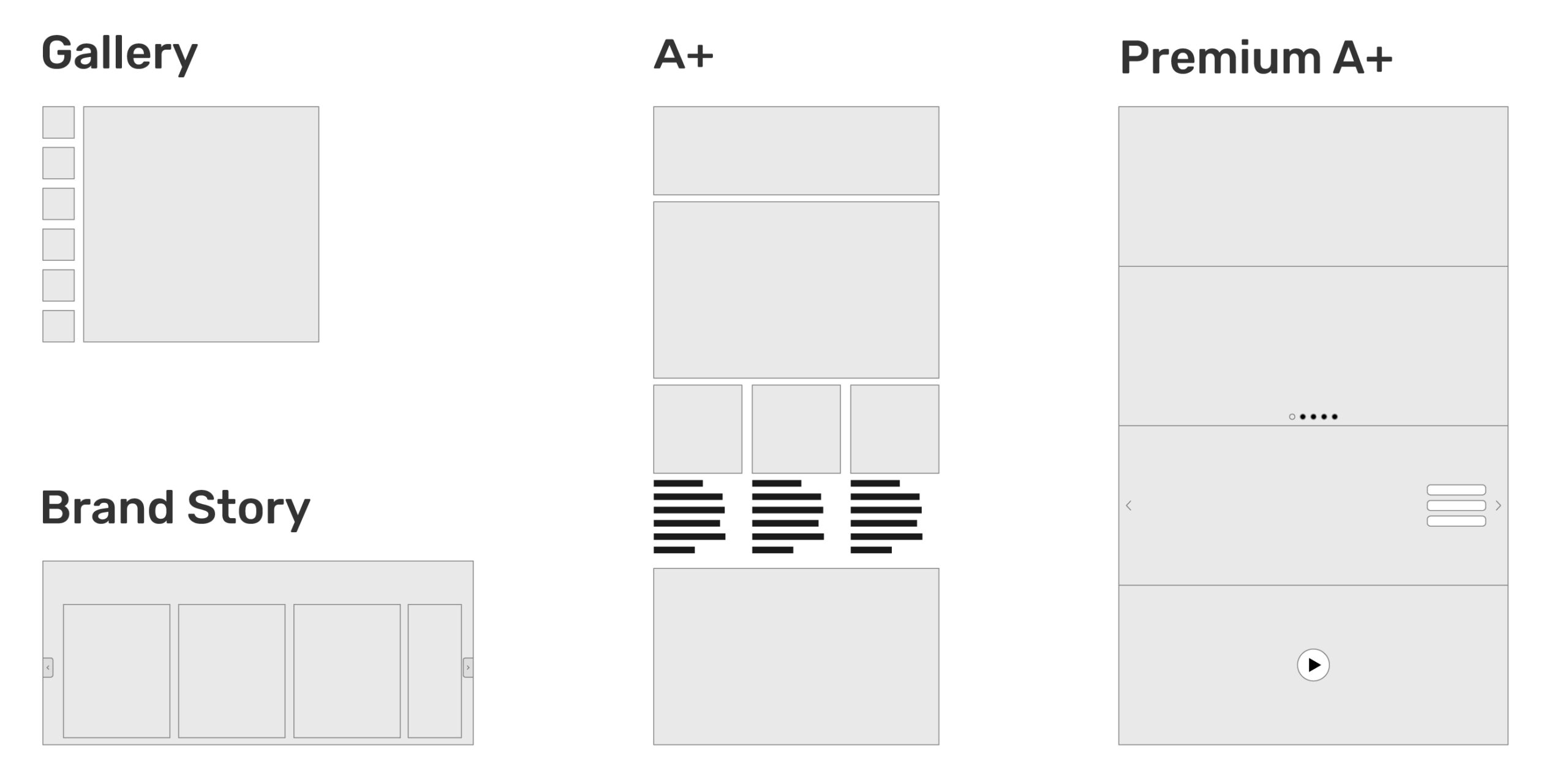
Amazon gives you multiple touchpoints to build visual brand identity, but most sellers only use 20% of what’s available. You’ve got seven listing images, A+ Content, Brand Story, storefronts, video content, and even packaging inserts that drive traffic back to Amazon. Each touchpoint either reinforces your brand or dilutes it.
The Real Estate You Actually Own
Let’s map out every visual branding opportunity on Amazon:
- Listing Images (7 slots): Your highest-impact real estate. Main image drives CTR from search results. Secondary images drive conversion on the product page.
- A+ Content (5-7 modules): Below-the-fold content that reduces return rates by answering pre-purchase questions visually.
- Brand Story: Shows up on every ASIN under your brand. Most sellers leave this empty or use generic corporate speak.
- Storefront: Your own multi-page website on Amazon. Traffic here has 3x higher conversion rates than cold traffic.
- Video Content: Related videos section and main image video slots. Video increases dwell time by 88%.
- Packaging and Inserts: Physical touchpoint that drives reviews and repeat purchases when done right.
Each piece needs to work together. A customer might see your main image in search results, click through to your listing, scroll your A+ Content, visit your storefront, then come back three weeks later through a branded search. Every touchpoint should feel like the same brand.
How the A10 Algorithm Rewards Visual Consistency
Amazon’s A10 algorithm doesn’t directly measure “brand consistency,” but it heavily weights the metrics that consistent branding improves:
- Click-Through Rate (CTR): Distinctive main images that stand out in search results
- Conversion Rate (CVR): Professional imagery that builds trust and reduces purchase anxiety
- Dwell Time: Engaging visual content keeps buyers on your listing longer
- Return Rate: Clear product images and A+ Content set accurate expectations
- Repeat Purchase Rate: Memorable brands get direct searches and repeat buys
According to Baymard Institute’s research on ecommerce product pages, 56% of users rely primarily on product images when making purchase decisions online. On Amazon, that number jumps to 63% because buyers can’t physically touch products.
Why Most Sellers Get This Wrong
Here’s what happens: sellers hire different photographers for each product launch. They use Canva templates for A+ Content. They let their VA create the storefront. Nothing matches. Your supplement bottles have lifestyle photography while your protein powder uses 3D renders on white. Your A+ Content has a different font than your packaging. Your brand looks like three different companies.
Buyers notice inconsistency subconsciously. They don’t trust brands that can’t maintain visual standards. Trust equals conversion. Lack of trust equals abandoned carts and high ACoS.
Step 1: Audit Your Current Visual Assets
Before building anything new, document what you have. Most sellers skip this step and wonder why their rebrand feels disjointed. You need a baseline to measure improvement.
The 15-Minute Visual Audit Process
Open a spreadsheet and audit every visual touchpoint:
- Screenshot all seven images from your top 5 ASINs
- Export your A+ Content modules as images
- Capture your Brand Story banner and content
- Screenshot your storefront homepage and category pages
- Document your packaging (photos of actual products)
- List all fonts, colors, and visual elements you find
Now answer these questions:
- Could a customer identify all products as the same brand without seeing logos?
- Do your lifestyle images use consistent models/settings?
- Are your infographics using the same design language?
- Does your packaging match your digital presence?
If you answered “no” to any question, you’re bleeding conversions.
Benchmarking Against Category Leaders
Pull up the top three brands in your category by BSR. Not your direct competitors — the category kings. Screenshot their visual assets using the same process. These brands didn’t accidentally reach the top. They invested in visual consistency.
Look for patterns:
- How do they structure their seven-image sequence?
- What visual hierarchy do they use in A+ Content?
- How do they differentiate variants while maintaining brand consistency?
- What emotions do their lifestyle images evoke?
You’re not copying. You’re understanding the visual language that resonates with your shared customer base.
Calculating the Cost of Visual Inconsistency
Let’s put numbers to this. If your current conversion rate is 12% and consistent branding could bump you to 15%, here’s the math:
Current state: 10,000 sessions × 12% = 1,200 orders
With consistent branding: 10,000 sessions × 15% = 1,500 orders
Additional orders: 300
At $50 average order value, that’s $15,000 in additional revenue per month. From the same traffic. Without spending another dollar on PPC.
Step 2: Define Your Visual Brand Foundation
Your visual brand isn’t just colors and fonts. It’s a system that scales across products, categories, and marketing channels. Get this foundation wrong and everything else falls apart.
Core Visual Elements That Actually Matter
Forget brand guidelines that live in PDFs nobody reads. You need practical visual standards that your entire team can execute:
Color Palette (Maximum 5 Colors):
- Primary brand color (used in 60% of visuals)
- Secondary brand color (30% usage)
- Accent color for CTAs and highlights (10% usage)
- Neutral backgrounds (white/gray for Amazon compliance)
- Text color (high contrast for readability)
Typography System:
- Header font (bold, readable at thumbnail size)
- Body font (clean, works at 12px on mobile)
- Maximum 2 font families total
- Consistent font sizes across all assets
Photography Style:
- Lighting direction (natural vs. studio)
- Background treatment (pure white vs. lifestyle)
- Model demographics and styling
- Prop selection and staging
- Post-processing standards
Creating Your Visual Hierarchy
Every image needs a clear visual hierarchy. Buyers scan, they don’t study. Your most important information should hit them in under 2 seconds.
Here’s the hierarchy that converts:
- Product hero shot (what am I buying?)
- Primary benefit (what problem does it solve?)
- Social proof (who else trusts this?)
- Differentiators (why choose this over competitors?)
- Technical details (sizes, specs, compatibility)
Apply this hierarchy to every visual asset. Your main image shows the product. Your second image shows the primary benefit. Your A+ Content reinforces both with lifestyle context.
Building a Modular Design System
Stop creating every asset from scratch. Build modular components you can mix and match:
Icon Library:
- Create 20-30 icons for common features/benefits
- Consistent line weight and style
- Works at 50px and 500px
- Single color with transparent background
Badge System:
- “Best Seller” badge template
- “New” or “Improved” badges
- Certification badges (organic, made in USA, etc.)
- Consistent size and placement rules
Layout Templates:
- Comparison chart template
- Size guide template
- How-to-use template
- Before/after template
When you need new assets, you’re assembling components, not starting from zero. This maintains consistency while cutting production time by 70%.
Step 3: Implement Consistent Listing Images
Your seven listing images are your highest-leverage visual branding opportunity. They drive both CTR from search results and conversion on the product page. Most sellers waste 4-5 slots on redundant angles or generic stock photos.
The High-Converting Seven-Image Sequence
Here’s the exact image sequence that maximizes conversion:
Image 1 – Main Image (CTR Driver):
- Product on pure white background
- Fill 85-90% of frame (maximum allowable)
- Optimal angle showing key features
- No text, logos, or props (Amazon compliant)
- Test 3-5 angles to find highest CTR
Image 2 – Benefit Callout (Conversion Driver):
- Product with 3-5 benefit callouts
- Focus on emotional benefits, not features
- Use your brand fonts and colors
- Keep text under 20% of image area
Image 3 – Lifestyle Context:
- Product in actual use environment
- Target customer demographic represented
- Show the problem being solved
- High-quality photography, not stock photos
Image 4 – Size/Scale Reference:
- Product with common objects for scale
- Dimensional callouts in inches and cm
- Comparison to competitor sizes if advantageous
- Critical for reducing size-related returns
Image 5 – Component/Close-up:
- Detailed shots of quality indicators
- Material textures and build quality
- Any unique mechanisms or features
- Shows what generic competitors hide
Image 6 – Social Proof/Trust:
- Testimonial quotes with star ratings
- Certification badges and awards
- Before/after results if applicable
- Media mentions or endorsements
Image 7 – Comparison/Guarantee:
- Side-by-side with inferior alternatives
- OR guarantee/warranty information
- OR what’s included in the box
- Choose based on category norms
Technical Specifications That Matter
Amazon accepts images up to 10,000px, but that’s overkill. Here’s what actually impacts performance:
- Dimensions: 2000x2000px minimum, 3000x3000px optimal
- File Format: JPEG for photos, PNG for graphics with text
- File Size: Under 10MB, ideally 2-5MB
- Color Profile: sRGB (not CMYK or Adobe RGB)
- DPI: 72 DPI for web, despite what photographers tell you
Name your files strategically: brand-product-angle-size.jpg. This helps with organization and potentially with Amazon’s image recognition.
A/B Testing Visual Elements
Your main image CTR can vary by 300% based on angle alone. Test these elements systematically:
- Product angles: Front vs. 3/4 view vs. top-down
- Background shades: Pure white vs. 5% gray
- Product arrangement: Single unit vs. multiple units
- Props: With packaging vs. without
- Zoom level: 85% frame fill vs. 95%
Use Splitly or Pickfu for rapid testing. A 2% CTR improvement on 50,000 impressions means 1,000 extra clicks. At 15% conversion rate, that’s 150 additional orders.
Step 4: Design A+ Content That Reinforces Your Brand
A+ Content isn’t just pretty pictures below the fold. It’s your chance to answer every objection, showcase your brand story, and reduce return rates by setting accurate expectations. Most sellers slap together some Canva templates and call it done. That’s why most sellers have 20%+ return rates.
A+ Content Modules That Actually Convert
Amazon gives you 5-7 module slots depending on your brand registry status. Here’s the optimal sequence based on Nielsen Norman Group’s eye-tracking research on how people scan web content:
Module 1 – Brand Banner:
- Full-width lifestyle image showing product in context
- Overlaid brand promise (not just your logo)
- Consistent with your storefront header
- 2000x600px minimum for retina displays
Module 2 – Problem/Solution Comparison:
- Left side: The problem your customer faces
- Right side: Your product as the solution
- Use actual customer language from reviews
- Include emotional imagery, not just product shots
Module 3 – Feature Breakdown:
- 4-6 key features with icon callouts
- Connect features to benefits explicitly
- Use consistent icon style from your library
- Keep text under 30 words per feature
Module 4 – Comparison Chart:
- Your product vs. “others” or specific competitors
- Choose comparison points you dominate
- Use checkmarks and X’s, not just text
- Include 5-8 comparison criteria
Module 5 – How-To or Size Guide:
- Step-by-step usage instructions with numbers
- OR complete sizing information
- Reduces return rate by answering pre-purchase questions
- Include both metric and imperial measurements
Module 6 – Customer Story:
- Before/after or lifestyle transformation
- Real customer photo if possible (with permission)
- Specific results with numbers
- Links emotional benefit to purchase decision
Module 7 – Brand Values:
- Manufacturing quality, sourcing, or mission
- Builds trust for premium pricing
- Differentiates from generic competitors
- Include certifications and guarantees
Mobile Optimization Is Non-Negotiable
70% of Amazon purchases happen on mobile. Your beautiful desktop designs mean nothing if they’re unreadable on phones. Here’s how to optimize:
- Text size: Minimum 14px, ideally 16-18px
- Contrast ratio: 7:1 for body text, 4.5:1 for headers
- Column width: Single column layouts only
- Button size: Minimum 44x44px touch targets
- Image text: Readable at 360px wide (iPhone SE)
Test every module on actual devices, not just browser dev tools. What looks good on your 27″ monitor might be illegible on a customer’s phone.
A+ Content That Reduces Returns
Returns kill profitability. Your A+ Content should set accurate expectations:
- Show actual product size with common objects
- Display color accurately (calibrate your monitors)
- Include material close-ups and texture details
- Show all items included in package
- Clarify what’s NOT included if commonly confused
Track your return reasons in Seller Central. If “not as described” exceeds 5%, your A+ Content isn’t doing its job.
Step 5: Build a Brand Storefront That Converts

Your Amazon storefront is free real estate that most sellers ignore. Traffic to your storefront converts at 28% on average, compared to 10-15% for cold traffic. That’s because storefront visitors are already interested in your brand, not just a single product.
Storefront Architecture That Drives Sales
Stop thinking of your storefront as a catalog. Structure it like a conversion funnel:
Homepage Structure:
- Hero banner with brand promise (not product grid)
- Best sellers section (social proof)
- Category navigation tiles (clear paths)
- New arrivals or seasonal features
- Brand story video if available
Category Page Best Practices:
- Group by use case, not just product type
- Include comparison modules between related products
- Add “shop the look” bundles for higher AOV
- Use lifestyle headers showing products in use
Navigation That Actually Works:
- Maximum 7 main categories (cognitive limit)
- Descriptive names, not clever ones
- Include “Gift Ideas” or “Starter Sets” for new customers
- Test tile vs. list layouts for your audience
Driving Traffic to Your Storefront
A beautiful storefront means nothing without traffic. Here’s how to drive visitors:
- Sponsored Brand Ads: Link to storefront, not product pages. Higher ROAS.
- Package Inserts: QR codes to exclusive storefront deals
- A+ Content Links: “See our full collection” CTAs
- Email Marketing: Drive subscribers to new storefront sections
- Social Media: Storefront URLs work better than product links
Track your storefront metrics weekly. Below 20% conversion rate means your storefront needs work. Above 35% means you should drive more traffic.
Storefront Elements That Build Trust
Your storefront is the only place on Amazon where you control the entire experience. Use it to build trust:
- About Us section: Real photos of team/facility
- Press mentions: Media logos and quotes
- Customer testimonials: Video preferred
- Guarantee details: Spell out your policies
- Contact information: Shows you’re a real business
Step 6: Maintain Visual Consistency Across Product Lines
Building visual brand identity on Amazon gets complex when you have multiple products. Each ASIN needs to stand alone while clearly belonging to your brand family. Most sellers either make everything identical (boring) or completely different (confusing).
Creating a Scalable Visual System
Your visual system needs to work whether you have 5 SKUs or 500. Build these components:
Product Family Architecture:
- Parent brand identity (consistent across all lines)
- Sub-brand elements for product categories
- Color coding system for variants or functions
- Consistent naming conventions
Example: Your supplement brand uses blue for sleep products, green for energy, orange for immunity. The layout, fonts, and quality cues stay identical. Customers can shop by color.
Image Template Library:
- Main image angles for each product type
- Infographic templates by category
- Lifestyle scene library by target demographic
- Icon sets for common features
When launching new products, 80% of your visual assets already exist. You’re just customizing the remaining 20%.
Version Control for Visual Assets
Your brand guidelines are useless if nobody follows them. Here’s how to maintain consistency at scale:
- Create a shared asset library: Google Drive or Dropbox with folder structure
- Use naming conventions: Brand_Product_AssetType_Version_Date
- Lock down master files: Only brand manager can edit templates
- Document specifications: One-page PDF with all technical requirements
- Regular audits: Monthly review of all live assets
| Asset Type | Update Frequency | Approval Required | Storage Location |
|---|---|---|---|
| Logo Files | Never | CEO/Founder | Master Brand Folder |
| Color Palette | Annually | Brand Manager | Brand Guidelines |
| Image Templates | Quarterly | Creative Lead | Template Library |
| Product Photos | Per Launch | Product Manager | Product Folders |
| A+ Content | Bi-annually | Marketing Team | A+ Archive |
Expanding to New Categories
When entering new categories, adapt your visual identity without abandoning it:
- Research category visual norms (customers expect certain things)
- Identify which elements are negotiable vs. core to your brand
- Test hybrid approaches that honor both brand and category
- Document lessons learned for future expansions
Example: Your premium kitchen brand entering outdoor grilling. Keep your color palette and quality cues, but adapt lifestyle imagery to backyard settings instead of indoor kitchens.
Step 7: Measure and Optimize Brand Performance

You can’t improve what you don’t measure. Most sellers track sales and reviews but ignore the visual metrics that drive long-term brand value.
KPIs That Actually Matter for Visual Branding
Track these metrics monthly to gauge brand health:
Direct Brand Metrics:
- Branded search volume: Track in Brand Analytics
- Storefront conversion rate: Should exceed 25%
- Repeat purchase rate: Target 20%+ within 90 days
- Subscribe & Save adoption: Shows brand trust
Visual Performance Metrics:
- Main image CTR: Test until above category average
- Time on page: Longer engagement = better visuals
- Video completion rate: For video content
- A+ Content scroll depth: Via Amazon Attribution
Business Impact Metrics:
- Price premium vs. generic: Strong brands command 20-40% more
- PPC efficiency: Branded campaigns should see 5-10x ROAS
- Return rate: Should decrease as visuals improve
- Review quality: Mentions of “quality” and “as described”
Building a Testing Calendar
Continuous improvement beats perfection. Test one element at a time:
Monthly Tests:
- Main image angles or arrangements
- Infographic color schemes
- A+ Content module order
- Storefront hero banners
Quarterly Tests:
- Complete image sequence overhauls
- Lifestyle photography themes
- Brand story messaging
- Video content formats
Annual Reviews:
- Complete brand audit
- Competitive space analysis
- Customer perception studies
- Visual guideline updates
ROI Calculation for Brand Investment
Here’s how to calculate the real ROI of visual brand building:
Investment:
- Professional photography: $3,000-10,000 per product line
- A+ Content design: $500-2,000 per ASIN
- Storefront development: $2,000-5,000 one-time
- Brand guidelines: $1,000-3,000 one-time
Returns (Annual):
- 3% conversion increase: $50,000+ on $1M revenue
- 20% higher prices: $200,000 on $1M revenue
- 30% repeat purchase rate: $150,000 in LTV increase
- 50% lower PPC costs: $25,000+ saved annually
Total investment: $15,000-25,000
Total annual return: $400,000+
ROI: 1,600-2,600%
These aren’t theoretical numbers. Brands that invest in visual consistency see these returns within 12-18 months.
Common Mistakes That Kill Visual Brand Identity
Even sellers who understand branding theory screw up the execution. Here are the mistakes costing you money:
- Copying competitor aesthetics: You become invisible in search results
- Over-designing for desktop: 70% of buyers are on mobile
- Changing visual direction every quarter: Customers can’t recognize you
- Using stock photography: Buyers see the same models everywhere
- Prioritizing pretty over clear: Confusion doesn’t convert
- Ignoring category conventions entirely: You need to fit in before standing out
- Letting different team members create assets: Inconsistency multiplies
- Not documenting decisions: You’ll forget why you chose things
The biggest mistake? Thinking visual brand identity is a “nice to have” instead of a conversion driver. Every day you delay is money left on the table.
Building visual brand identity on Amazon isn’t about winning design awards. It’s about creating a systematic visual language that converts browsers into buyers and buyers into brand advocates. Start with an audit. Define your foundation. Execute consistently. Test relentlessly. The sellers dominating your category didn’t get there by accident. They invested in visual brand identity that commands premium prices and customer loyalty.
Your move.
Sources & References
Related Reading
Related Reading
Frequently Asked Questions
How much should I invest in professional product photography for Amazon?
Expect to invest $400-800 per SKU for a complete 7-image set from a professional Amazon photographer. That includes white background shots, lifestyle images, and infographics. For a 10-SKU catalog, budget $4,000-8,000. The ROI comes from 20-30% higher conversion rates compared to DIY photography, paying for itself within 60-90 days.
Can I build visual brand identity if I’m drop shipping or selling generic products?
Yes, but you need to work harder. Focus on unique infographics, comparison charts, and lifestyle imagery that your suppliers don’t provide. Create custom A+ Content that tells a story about why your curation of products matters. Even generic products can build brand loyalty through consistent visual communication and superior customer education.
How often should I update my Amazon listing images and A+ Content?
Test new main images monthly until you find a winner, then lock it for 6-12 months. Update secondary images quarterly based on customer questions and return reasons. Refresh A+ Content every 6 months to incorporate new reviews, address seasonal changes, or highlight new features. Complete visual overhauls should happen annually or when entering new categories.
What’s the most important visual element for building brand recognition on Amazon?
Color consistency across all touchpoints drives the highest brand recall. Pick a primary brand color and use it in exactly the same shade (document the hex code) across all images, A+ Content, and packaging. Customers subconsciously recognize color patterns faster than logos or fonts. Test this by covering logos in your images — can customers still identify your brand?
Should I show my product packaging in Amazon listing photos?
Yes, if your packaging adds value or builds trust. Show packaging in images 2-3 if it includes premium unboxing experience, sustainability features, or gift-ready presentation. Skip it if you use generic poly mailers or basic boxes. For consumables and beauty products, always show packaging as it indicates freshness and authenticity to buyers comparing options.