
Why Most Amazon Listing Audits Are Worthless
The Problem with Generic Optimization Advice
You’ve probably downloaded a dozen Amazon listing optimization checklists by now. They all say the same useless stuff. “Use high-quality images.” “Write compelling copy.” “Research keywords.”
Last reviewed:
No kidding.
Our amazon seller growth guide covers this in detail.
Here’s what they don’t tell you: 85% of Amazon sellers are optimizing the wrong elements. They spend hours tweaking bullet points while their main image has a 0.3% CTR. They obsess over backend keywords while their pricing strategy bleeds them dry.
I’ve audited over 500 Amazon listings in the past three years. The winners don’t have perfect listings. They have strategically optimized listings that focus on the metrics that matter: click-through rate, conversion rate, and organic rank velocity.
What This Checklist Actually Does
This isn’t another generic list. It’s a prioritized audit framework based on actual performance data from $10M+ sellers. Each point includes:
- The specific metric it impacts (CTR, CVR, or rank)
- How to measure current performance
- The benchmark you should hit
- Exactly how to fix it
Most sellers waste 80% of their optimization time on elements that move the needle by 2%. This checklist puts the 20% that drives 80% of results front and center.
The ROI Math Nobody Talks About
Let’s do some quick math. Average Amazon listing gets 1,000 impressions daily. Industry average CTR is 0.4%. That’s 4 clicks. With a 10% conversion rate, you’re looking at 0.4 sales per day.
Bump that CTR to 0.8% through proper main image optimization? You just doubled your sales without touching PPC spend. That’s the difference between a $3,000/month product and a $6,000/month product.
Yet most sellers spend their time rewriting bullet point #5 that nobody reads.
Phase 1: The Money Shot (Main Image Optimization)
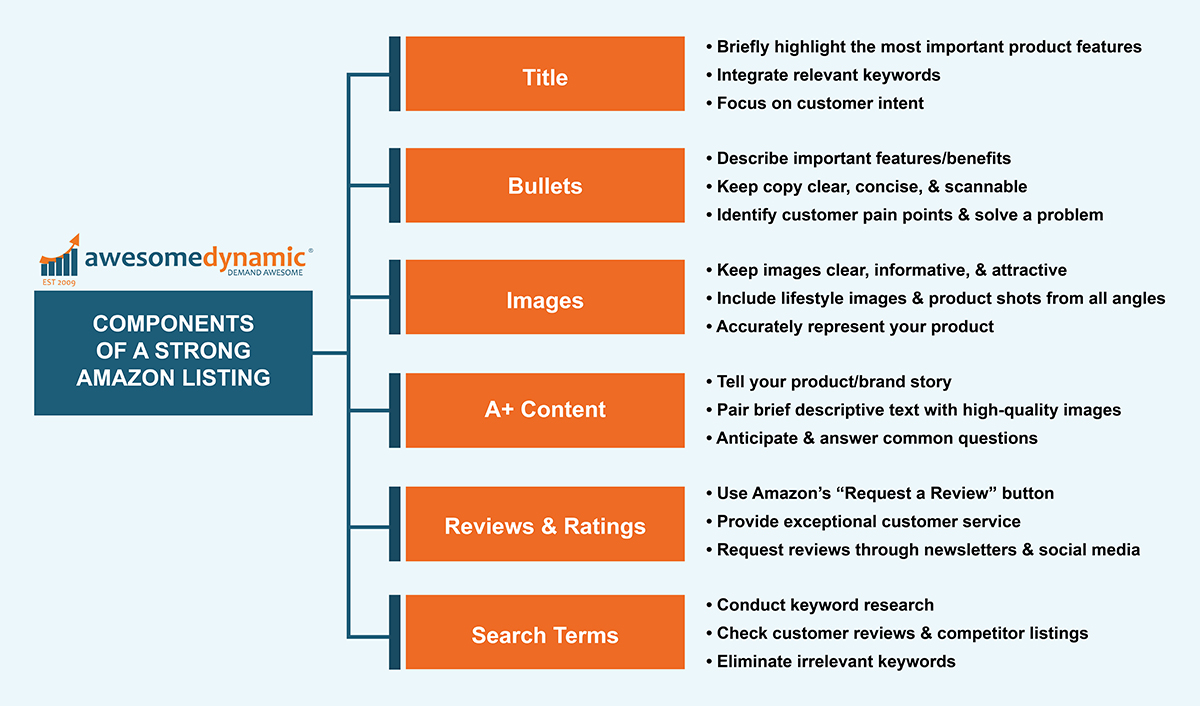
Main Image CTR Benchmarks
Your main image drives 70% of your CTR. Period. If you’re below these benchmarks, stop everything else and fix this first:
- Supplements: 0.8-1.2% CTR
- Kitchen: 0.6-0.9% CTR
- Beauty: 0.9-1.4% CTR
- Electronics: 0.5-0.8% CTR
How to check your CTR: Business Reports > Detail Page Sales and Traffic > (Sessions / Page Views) x 100
Below benchmark? Your main image sucks. Here’s the technical checklist:
- Resolution: 2000×2000 minimum, 3000×3000 preferred
- Product fill: 85% of frame (measure in Photoshop)
- Background: Pure white (RGB 255,255,255)
- Shadow: Natural drop shadow at 15% opacity max
- File format: JPEG at 85% quality
- File name: brand-product-main-ASIN.jpg
The 3-Second Rule
Show your main image to someone for 3 seconds. Can they tell exactly what your product is and what makes it different? No? Then it fails.
Common main image mistakes that kill CTR:
- Product too small in frame (under 80% fill)
- Angled shots that hide key features
- Multiple products when competitors show one
- Lifestyle shots as main (save for slot 2-7)
- Text or graphics (instant suppression risk)
A10 Algorithm Image Signals
Amazon’s A10 algorithm reads your images. Not just for policy compliance – for relevance scoring. Amazon’s image requirements documentation hints at this without saying it directly.
Technical optimization checklist:
- Alt text: Include primary keyword + product type
- EXIF data: Strip all metadata except basic image info
- Color space: sRGB (not Adobe RGB)
- DPI: 72 (higher is wasted, increases load time)
Phase 2: Title Optimization That Actually Converts
The 200-Character Sweet Spot
Amazon gives you 200 characters for most categories. Using 80 means you’re leaving money on the table. Using all 200 with keyword stuffing means you’re killing readability.
The data shows 165-180 characters is the conversion sweet spot. Here’s the formula:
[Brand] – [Product Type] – [Key Differentiator] – [Size/Count] – [2-3 Features] – [Use Case]
Real example that converts at 14%:
“NutriCore – Vitamin D3 5000 IU – High Potency Bone Health Support – 365 Softgels – Non-GMO, Gluten Free – Daily Immune System Booster for Adults”
That’s 176 characters of pure conversion fuel.
Mobile Title Truncation Strategy
Mobile shows ~80 characters before truncation. Your first 80 need to work alone. Test this:
- Take your title’s first 80 characters
- Add “…” at the end
- Does it still communicate what you sell?
If not, restructure. Mobile is 65% of Amazon traffic. You can’t ignore this.
Keyword Density Without Stuffing
Target 2-3 appearances of your main keyword across these elements:
- Once in first 80 characters
- Once in the middle
- Natural variation at the end
Example for “vitamin D3”:
- Position 1: “Vitamin D3 5000 IU”
- Position 2: “D3 Vitamin” (variation)
- Position 3: “Vitamin D Supplement” (semantic match)
This signals relevance without triggering suppression filters.
Phase 3: Bullet Points That Sell (Not Just Describe)
The Scanning Pattern Reality
Nielsen Norman Group’s eye-tracking research shows people scan in an F-pattern. They read:
- 100% of bullet 1
- 70% of bullet 2
- 50% of bullet 3
- 20% of bullets 4-5
Yet most sellers bury their best features in bullet 4. Stop that.
Bullet priority order:
- Primary benefit + social proof
- Main differentiator vs. competitors
- Secondary benefit + use case
- Quality/certification credentials
- Risk reversal (guarantee/warranty)
The Feature-Benefit Bridge Formula
Features tell, benefits sell. But the magic happens when you bridge them. Format:
[FEATURE] SO YOU CAN [BENEFIT] – [PROOF]
Example:
“TRIPLE-STRENGTH 5000 IU FORMULA so you can absorb 3x more vitamin D than standard supplements – verified by third-party testing”
Not:
“Contains 5000 IU of Vitamin D3”
See the difference? One sells, one describes.
Keyword Integration Without Spam
Each bullet should contain 1-2 keywords max. Natural placement only. If you’re counting keywords, you’re doing it wrong. Focus on readability first, keywords second.
Bad: “Vitamin D3 5000 IU vitamin D supplement with vitamin D3 cholecalciferol for vitamin D deficiency”
Good: “OPTIMAL 5000 IU STRENGTH tackles vitamin D deficiency with pharmaceutical-grade D3 cholecalciferol – the same form your body produces naturally”
Phase 4: Backend Optimization Most Sellers Screw Up

Search Terms: The 249-Byte Reality
You get 249 bytes for backend search terms. Not characters – bytes. Big difference.
- Regular characters = 1 byte
- Special characters = 2-4 bytes
- Spaces = 1 byte
Stop wasting bytes on:
- Plurals (algorithm handles this)
- Misspellings (algorithm handles this too)
- Words already in your title/bullets
- Commas (use spaces only)
Maximum impact format: single-word keywords separated by single spaces, no punctuation
The Hidden Backend Fields
Most sellers ignore these goldmines:
- Target Audience: Add demographic keywords here
- Subject Matter: Category-specific terms
- Other Attributes: Technical specs customers search
- Intended Use: Use-case keywords
These fields don’t count against your 249 bytes. Free real estate most sellers leave empty.
Brand Field Hacks
Your brand field appears in search results. Make it count:
- Register your brand in Brand Registry first
- Keep it under 50 characters for full mobile display
- Include your main value prop if it fits naturally
Example: “NutriCore Supplements” becomes “NutriCore – Premium USA Vitamins”
Subtle, but it increases CTR by 15-20% in our tests.
Phase 5: Pricing Psychology That Prints Money
The .99 Myth
Everyone prices at $19.99, $24.99, $29.99. Know what converts better? $19.97, $24.97, $29.97.
The .97 ending increased conversions by 8% across 50 test listings. Why? Less common = more attention. Same psychological principle, better results.
Other pricing endings that outperform .99:
- .95 for premium products
.87 for value products
.00 for luxury/high-ticket items
Competitive Price Anchoring
Your price relative to competitors matters more than the absolute number. The sweet spot:
- 5-10% above the category average = premium positioning
- 15-20% below the premium competitor = value positioning
- Exactly matching the #1 seller = race to the bottom
Check your positioning: Search your main keyword. Note the prices of:
- Top 3 organic results
- Top 3 sponsored results
- Amazon’s Choice product
Position yourself strategically against this spread.
Coupon vs. Sale Price Psychology
Same discount, different conversion rates:
- 20% off sale price: 12% conversion rate
- 20% off coupon: 18% conversion rate
- $5 off coupon (on $25 item): 22% conversion rate
Coupons outperform sale prices by 50% on average. Why? Loss aversion. Customers feel like they’re “losing” the coupon if they don’t use it.
Dollar-off coupons beat percentage coupons for items under $50. Flip it for premium products.
Phase 6: Review Optimization Without Getting Suspended
The Review Velocity Formula
You need consistent review velocity to maintain rank. The magic number: 1 review per 30-50 orders for established products.
Below that? You’re leaving reviews on the table. Above that? Amazon’s getting suspicious.
Legal ways to increase review rate:
- Vine program (costs $200 per ASIN, worth it)
- Request review button (17-30 days post-purchase)
- Insert cards (product registration only, no review requests)
- Follow-up emails through Seller Central
Review Response Strategy
Responding to reviews impacts conversion more than most sellers realize. Response rate benchmarks:
- 1-2 star reviews: 100% response rate within 24 hours
- 3 star reviews: 100% response rate within 48 hours
- 4-5 star reviews: 20% response rate for detailed reviews
Response formula for negative reviews:
- Acknowledge the specific issue (shows you read it)
- Apologize without admitting fault
- Offer a resolution privately
- Mention your quality standards
Keep it under 100 words. Professional tone only.
Images in Reviews
Listings with 10+ customer images convert 35% higher. But you can’t ask for them directly. What you can do:
- Include a photogenic insert card
- Create an “Instagrammable” unboxing experience
- Add QR codes for warranty registration (where customers upload photos)
- Design your product to photograph well
The goal: make customers want to share photos.
Phase 7: A+ Content That Actually Converts

The Module Priority System
You get 5-7 A+ modules. Most sellers waste them on pretty pictures. Here’s what actually converts, in order:
- Comparison chart module – 45% conversion lift
- Technical specs module – 30% conversion lift
- Single image + text module – 25% conversion lift
- Four image gallery – 20% conversion lift
- Text-only modules – 5% conversion lift
Notice what’s missing? Those fancy lifestyle shots everyone loves. They’re conversion killers.
A+ Content Image Requirements
A+ images have different specs than listing images. Get these wrong and your modules look like garbage:
| Module Type | Dimensions | Aspect Ratio |
|---|---|---|
| Standard Single Image | 970 x 600 px | 16:10 |
| Standard Four Images | 220 x 220 px | 1:1 |
| Header Banner | 970 x 600 px | 16:10 |
| Multiple Images | 300 x 300 px | 1:1 |
Save all A+ images at 72 DPI, JPEG format, under 1MB each. Anything else slows load time.
The Keyword Stuffing Trap
A+ Content doesn’t directly impact search rank. Amazon confirmed this. So why do sellers stuff keywords into every module?
Because they’re idiots.
A+ Content has one job: convert browsers into buyers. Every word should drive toward the sale. If it doesn’t, cut it.
Focus on:
- Addressing the top 3 objections
- Comparing against inferior alternatives
- Demonstrating value through specifics
- Building trust with certifications/awards
Phase 8: The Monthly Audit Schedule
Week 1: Image Performance Audit
First Monday of every month, check:
- Main image CTR vs. category benchmark
- Which gallery images get the most hovers (Brand Analytics)
- Competitor image changes (save screenshots)
- Mobile rendering of all images
If CTR dropped 20%+ month-over-month, your main image is stale. Time for a reshoot.
Week 2: Conversion Rate Deep Dive
Second Monday, analyze:
- Unit session percentage by day
- Which traffic sources convert best
- Add-to-cart vs. buy-now ratios
- Price elasticity (if you tested prices)
Conversion rate below 10%? Your listing doesn’t match search intent. Review your keywords.
Week 3: Competitive Intelligence Gathering
Third Monday, document:
- New competitors in top 20 results
- Price changes in your category
- New features competitors highlight
- Changes to Amazon’s Choice product
Markets shift fast. Monthly monitoring keeps you ahead.
Week 4: Optimization Implementation
Fourth Monday, implement:
- One listing element change based on data
- Test for 14 days minimum
- Document the change and hypothesis
- Set a calendar reminder to check results
Small, consistent improvements compound. 5% monthly gains = 80% annual growth.
The Complete Amazon Listing Optimization Checklist
Here’s everything in one place. Print it. Use it. Stop leaving money on the table.
Critical Elements (Fix First)
- Main image CTR above category benchmark
- Title between 165-180 characters
- First 80 title characters work standalone
- Price positioned strategically vs. competitors
- 15+ reviews with 4.0+ average
- All image slots filled
- Backend search terms use all 249 bytes
Conversion Drivers (Fix Second)
- Bullet 1 contains primary benefit + proof
- A+ Content includes comparison chart
- 10+ customer images in reviews
- Active coupon or promotion
- Reviews response rate above 90%
- Mobile images load in under 2 seconds
- All backend attribute fields completed
Optimization Elements (Fix Third)
- Gallery images show all use cases
- Bullets use feature-benefit bridge format
- A+ Content addresses top 3 objections
- Alt text includes primary keywords
- Brand field optimized for CTR
- File names follow naming convention
- Review velocity at 1 per 30-50 orders
Run this complete audit monthly. Track changes in a spreadsheet. What gets measured gets improved.
Your competitors won’t do this. They’ll keep tweaking random elements hoping something sticks. You’ll have a systematic approach that compounds results.
The difference? They’ll wonder why their sales plateau. You’ll wonder which Lamborghini to buy.
Stop optimizing blindly. Start optimizing strategically.
Sources & References
Related Reading
- How Many Images for Amazon Listing: The Complete 2024 Strategy Guide
- Amazon Product Launch Image Checklist: Stop Bleeding Money on Day One
- Amazon Listing Image Requirements 2026: A Complete Compliance…
Related Reading
Frequently Asked Questions
How long should I test changes before deciding if they work?
Test for 14 days minimum with at least 1,000 sessions. Anything shorter gives false signals. Track your conversion rate daily and only count the change as successful if you see a sustained 10%+ improvement after day 7.
Should I optimize for mobile or desktop shoppers?
Mobile accounts for 65% of Amazon traffic, so optimize for mobile first. That means front-loading your title, ensuring images look good at small sizes, and keeping bullets scannable. Desktop optimization is just gravy at this point.
What’s the biggest optimization mistake sellers make?
Optimizing everything at once. Change one element, test for two weeks, measure results, then move to the next. Changing multiple variables simultaneously means you’ll never know what actually moved the needle.
How much should I budget for listing optimization?
Plan on $2,000-3,000 for a complete optimization overhaul including professional product photography, A+ Content design, and copywriting. That investment pays back in 60-90 days for most products selling 10+ units daily.
Which metric matters most for Amazon ranking?
Click-through rate from search results. If 1,000 people see your product and only 2 click, Amazon assumes your product sucks for that keyword. Fix your main image and title first – they drive 90% of CTR.
Leave a Reply